Understanding Security Operations Center (SOC) Types and Deployment Models

Technology exists to support the business goals of an organization. As advanced as technology gets over time, it still needs to be supported. Issues and complexity exist and need to be tended to, often on a daily basis. For general information technology; a help desk, service desk, or operations center is there to receive and triage general issues. Often, this group is the initial point of contact for all IT related issues. An adjacent support function to the help desk, is the network operations center (NOC). The main function of the NOC is to monitor the network infrastructure to ensure that all devices and links are online and performing at optimal levels. When issues arise, the NOC will triage and troubleshoot those issues, escalating to other individuals when necessary. From a security perspective, we have the option of a similar group, called the security operations center (SOC). The main functions of a SOC are to monitor the organization for threats and events, then act on those by investigating, analyzing, and escalating them. That being stated though, just like many other aspects, there is no “one size fits all” when it comes to the types and deployment models of a security operations center.

SOC Types
There are three main types of security operations centers: threat-centric, compliance-based, and operational-based. A threat-centric SOC focuses on seeking out threats and malicious activity on the network. Threat-centric SOCs can be prepared for this by leveraging threat intelligence sources, staying updated on new and existing vulnerabilities, and understanding baseline traffic within the organization’s network so that they understand what specifically is anomalous behavior. A compliance-based SOC takes a different approach. The focus of a compliance-based SOC is to ensure that the organization stays in compliance of regulatory standards. They can do this by understanding those regulations and comparing them to the operations and posture of the organization to ensure compliance. Finally, an operational-based SOC focuses on understanding internal business operations to be able to protect it. Focuses of the operational-based SOC may include identity and access management and maintaining intrusion detection system (IDS) rules as well as firewall rules.

SOC Deployment Models
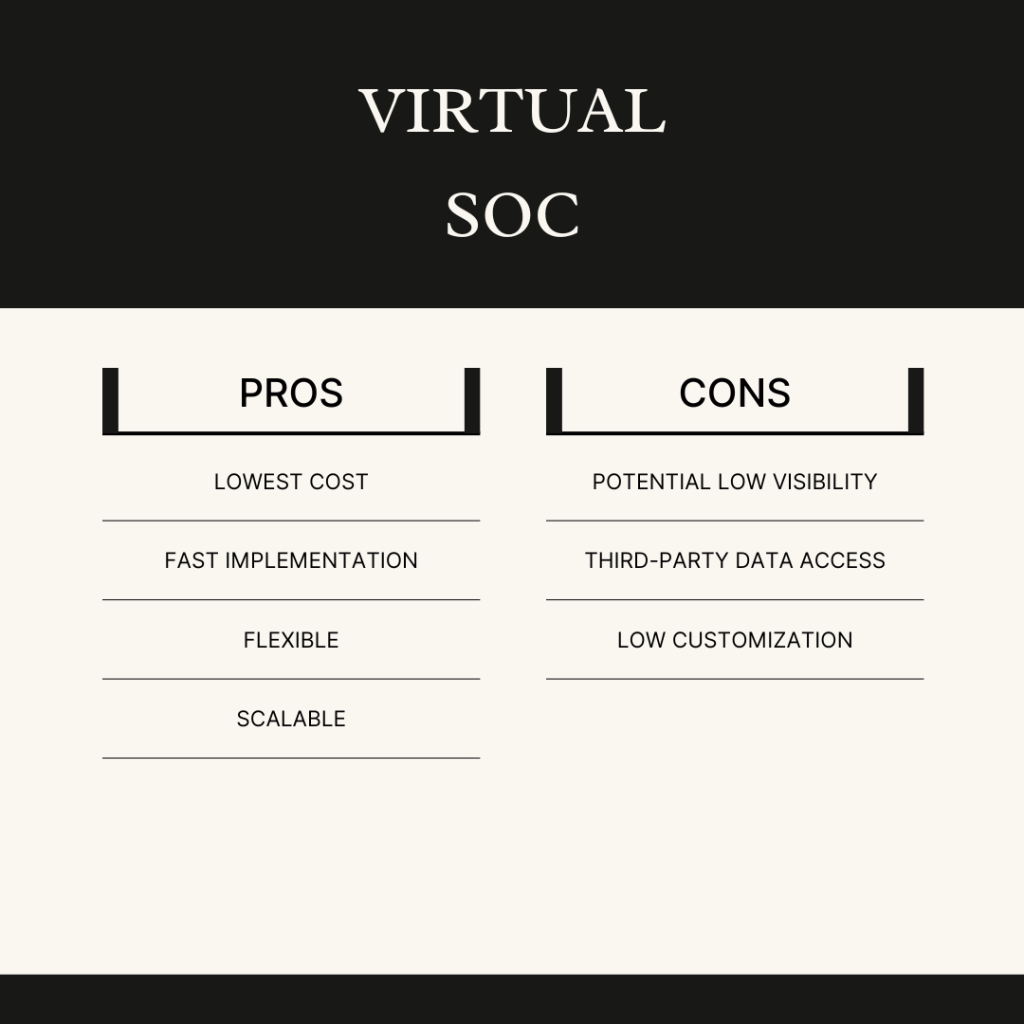
Just like there are multiple types of security operations centers, there are also multiple ways in which a SOC can be deployed. There are three main SOC deployment models: internal, virtual (vSOC), and hybrid. An internal SOC is built and operated by the organization itself. It is staffed and run by employees internal to the organization. For organizations who have or are able to recruit and retain talented SOC individuals and either cannot or do not desire to allow third-party companies to have access to their data, the internal SOC is a fit. The virtual (vSOC) deployment model is a contracted service. All SOC operations are handled by a third-party business. The vSOC model makes sense for organizations who do not have the staff to handle the internal SOC model and they are able to allow a third-party to have access to their data. Finally, you guessed it, the hybrid SOC deployment model is a combination of the internal and vSOC models. This model is a fit for organizations who want to augment their internal staff with external expertise and coverage as well. See the images below for a look at the pros and cons of the three different SOC delivery models.

Rounding it Out
A security operations center can be crucial to the security and continued operations of a business. A SOC keeps a watchful eye over an organization by detecting and handling incidents and events. There are multiple ways a SOC can operate and be deployed. SOC types include: threat-centric, compliance-based, and operational-based, while the deployment models include: internal, virtual (vSOC), and hybrid.

Sources: I gained this information by going through the “Understanding Cisco Cybersecurity Operations Fundamentals | CBROPS” course on Cisco U.


A Reboot to Motivation?

Does the concept of motivation need a reboot? According to Daniel Pink, a reboot is not quite enough, motivation needs a whole new version. I recently listened to the audiobook version of Drive by Daniel Pink and it gave me much to ponder. I often consider myself as someone who is driven and motivated, but before going through this book, I had never stepped back and thought about the differences between intrinsic and external motivating factors. I had also never really considered how the reasons we are motivated have evolved, and can continue to evolve. This book gives a good look at how to approach motivation and drive both personally and from a business perspective.

The Different Factors
The book describes how there are two main types or factors of motivation: intrinsic and external. This might not be the point that the author was trying to drive home (pun intended), but I contrast the two as things that you have to do (external motivation), and things that you want to do (intrinsic motivation). Let’s start with external factors because I’ll be honest, these are the things I typically think about to help “get me out of bed in the morning”.

External motivating factors are just that. These are the things that you historically have had to do to survive and maintain the lifestyle that you want to live. These factors include making money, supporting a family, paying the mortage, and the list goes on.

Intrinsic motivation lies more with doing specific things because they bring us interest, passion, and joy. Curiosity was a large point here, and children were brought up as an example. Young children often seem to be enamored with learning and figuring things out. Intrinsic motivation is what seems to drive us when we are young. Daniel then goes on to describe that at some point, many of us seem to be drawn to, or maybe pushed to external motivation as a main focus. For example we hit a certain age and need to get a job, car, apartment, house, etc.

The Motivation Operating System Versions
Personally, being in different roles within information technology disciplines throughout my career, I appreciated how motivation was likened to an operating system with multiple versions developed over time. It helped me understand where we have come from and where we could go, in terms of drive and motivation.

Version 1
Version 1 of motivation was all about the goal of survival. The motivating factors here centered around staying alive. Finding food, shelter, and safety were the main objectives.

Version 2
The book then goes on to describe that eventually humans evolved to a point in which we were able to adopt a new version of motivation. Once we as a species got past being in literal survival mode every day, the concept of motivation needed to evolve as well. Version 2 adopts the “rewards and punishment” method, also known as the “carrot and stick” approach to motivation. The main idea here is that if you do something good or what you are supposed to be doing, you get a reward, but if not, you receive some sort or punishment or negative reaction. While this can be and is effective to an extent, there are scenarios in which this method can be counterintuitive.

Version 3
Version 3 of the motiviation operating system is meant to address the shortcomings of version 2. Daniel writes that version 2 works well for tasks and activities in which the steps to complete those tasks and activities are well documented and laid out. Version 2 is centered around the concept of “if/then” rewards. If you go through these steps and complete these tasks everyday this week, then you will receive your paycheck. However, this type of system falls short once the tasks are not as straightforward. Once we start needing to complete tasks in which we have to be creative, the “if/then” system of rewards can potentially be harmful. The idea is that when we are externally motivated for tasks in which we must be creative, or need to persuade others, we may cut corners or not have our hearts and full energy and creative abilities dedicated to the task at hand. From a business perspective, version 3 of the motivation operating system is about finding those intrinsic motivating factors that were introduced earlier.

How Do We Upgrade to Version 3?
On the business/career side of things, I think we all understand that money is a major driving factor which brings up version 2 of the motivation operating system. You get hired to do a job, and if the work gets done, you get paid. If the work does not get done (or done well), you may not have a job there for long. We are back to the carrot and stick method of motivation that works in some cases, but can be detrimental in others like mentioned earlier. With this seemingly being the norm, how do we upgrade to version 3 of the motivation operating system in those instances that it is necessary? Daniel Pink explains a couple of ways to do this that I thought were noteworthy. First off, compensate employees enough so that they are not worried about their compensation. To me, this allows the employee to feel at ease with their pay and are more freed up to focus on doing their job well. The other method that stood out to me was to give people autonomy over their work. It seems that people will be more engaged in the work when they have control over what they do and how it gets done.

Final Thoughts
I do not think I really new what to expect when I started this book. As I got into it, I can definitely say that to this point, I have been more focused on external factors of motivation (version 2) rather than intrinsic factors (version 3). Don’t get me wrong, I enjoy my career, but I think I could better maximize it and my personal life if I change my perspective, at least somewhat. For example, I consider myself a “life-long learner”. From an education perspective, I could balance learning concepts that I feel like I have to learn, with those that I more so want to learn. I will probably have to make a conscious effort to better understand what makes me geniunely curious. This should be fun. I think a good step that might be helpful for me would be to tie this back to my strengths that I learned about from the Now, Discover Your Strengths book and companion StrengthsFinder test. Leaning into my inherent strengths should be a good guide for helping me to find intrinsic motivation.

Featured image from Ricky Esquivel via Pexels.

Buzzword Bio – Software Defined Networking

For many years, networks were exclusively built, operated, and maintained as a grouping of individual devices. To build networks, we would log into devices individually and manually, or by using some sort of scripting solution. For network operations, each network device had to have its own knowledge of the picture of the network. Each device had to build and maintain its own control plane (routing table) to be able to properly route and forward packets throughout the network. As far as troublehsooting and maintenance, we have been logging into devices individually and manually for quite some time to run troublehsooting commands when diagnosing problems, and when performing software upgrades. Now, don’t get me wrong, I can imagine that many networks are still designed and operate in this way and it works well and is by no means a broken process. That being stated, I think we can all see where there is room for improvement. What are these specific areas of improvement? First off, management and troubleshooting for the network could be made to be easier and more streamlined. Manaully logging into the command line interface (CLI) of each network device can be tedious and error prone. Also, unless there is another system set up for log aggregation and correlation, all of the valuable data used troubleshooting and diagnosing issues is right there on the device and needs to be accessed manually and individually. Secondly, with these traditional networks that we have been highlighting so far, there is not much flexibility when it comes to logical topology and design. We know that building Layer 3 networks to the edge (access layer) takes away the complexity of having to manage and deal with large Layer 2 topologies and spanning tree protocol (STP), but there can be many cases in which Layer 2 networks need to span multiple switches, so that complexity has to be there. It would be nice if we had a way for deploying the solid foundation of Layer 3 networks across the board to maintain stability, while still being able to support client mobility (spanned Layer 2 networks). Well, we do have that, and it is the concept of software defined networking (SDN). SDN in it of itself is not a specific product, it is a methodology for building, managing, and maintaining networks. In my eyes, software defined networking has two major characteristics that set it apart from traditional networking.

Decoupling the Control Plane
A large component of SDN is that of underlays and overlays. We can think of an underlay as the foundation of our network infrastructure. The sole purpose of the underlay is to route packets quickly and efficiently. To me, route is the key word here. Software defined networking and the concept of underlays and overlays allows us to build solid, Layer 3 networks from end to end that do not have to rely on the complexity of spanning tree protocol (STP). Overlay protocols can then be used on top of these underlay networks to create different logical topologies to support our different applications and use cases. A use case that I often come back to is Layer 2 extension over a Layer 3 underlay. This gives us the ability to allow devices to roam through a facility, maintain their existing IP addresses, and keep Layer 2 adjacencies with devices on the broadcast domain, even though in the underlay we are crossing Layer 3 boundaries. How is this able to happen? By using the concept of SDN, through overlay technologies, we are able to decouple the control and data planes on network infrastructure devices. In a traditional networking sense, each router or Layer 3 switch in a network needs to directly know how to get to every destination in the network, and does this with a combination of dynamic routing protocols and static routing. With software defined networking in the overlay network, the control plane concept is removed from the individual router or Layer 3 switch, and replaced with a centralized controller and lookup process so that the individual network infrastructure device can figure out where to forward packets in the data plane. I like to relate this to the DNS lookup process. Clients do not need to learn or download a database of all possible hostname to IP resolutions. When they need to resolve a name that is not already in their cache, they ask a DNS server. Decoupling the control plane from routers and Layer 3 switches is a similar concept. The network devices query the centralized control plane for a destination network, then are able to build an overlay tunnel with the far end router (if one doesn’t exist already), to forward packets to it over the underlay network. The concept of a centralized control plane is what makes me think of the term fabric. When we remove the control plane function from the individual devices and centralize it on the controller, I feel that we are treating the network as a single cohesive unit, rather than multiple individual routers sharing information and communicating.

Centralized Management
At the end of the previous section, I mentioned that when we centralize the control plane, we are treating the network infrastructure as a single entity rather than a grouping of individual devices. Well, with the concept of centralized management in SDN, the same thing is happening. With traditional networking, devices are managed separately and individually, typically via the CLI or with abstraction and scripting. Conversely, similar to the control plane, software defined networking centralizes the management plane. This allows network administrators and engineers to manage their infrastructure from a single point. This can be done either through the specific SDN product’s graphical user interface (GUI), or through another management platform that organizations may already leverage. SDN embraces the use of application programming interfaces (APIs) to communicate northbound with management and other systems, and southbound to communicate with the network devices it manages. Outside of configuration, software defined networking platforms can aggregate logs and telemetry from network devices and provide a centralized point for network monitoring and troubleshooting. Another large benefit of centralized management is the ability to handle code upgrades on the network infrastructure centrally, rather than having to address each device manually.

Closing
Over recent years, software defined networking has really changed how we manage and operate networks. There are many benefits we can gain from leveraging SDN including centralized control and management planes. These concepts give us the benefits of standardization and flexibility at the same time. That being stated, there are typically trade-offs with many things, including SDN and overlays. For instance, with building overlays on top of Layer a 3 underlay, yes we are essentially removing the complexity that comes with STP, but we are adding the complexity of overlay technologies. In the end, with overlays, I like to think of it as not removing complexity, but hiding it. As I started writing this, I completely forgot that I had written about SDN already as part of my Cloud Essentials+ Journey series. Feel free to check out that article as well to see how much I may have contradicted myself with this post.

*Featured image from Manuel Geissinger.

Buzzword Bio – Macro/microsegmentation

Using the network as an enforcement point for security policy is a concept that has been around for a long time and does not seem to be going anywhere. Since traffic is already traversing the network, it is a natural point to either allow or deny network packets. Also, with the importance of defense in depth, network segmentation can be a great compliment to security controls such as endpoint protection solutions, email security, and edge network firewalls. Network segmentation allows for control between devices and networks. With network segmentation, some sort of policy is being applied in the network to control traffic flows. The main idea here is to limit how hosts on a network are able to communicate. The goal of segmentation is to reduce risk. First, segmentation reduces the risk of privacy implications by ensuring specific devices and networks altogether are separate from others. Secondly, network segmentation can reduce the risk of a security breach. If a vulnerable host gets compromised, network segmentation can limit the impact of that breach by not allowing the compromised host to have free reign on the network. Within the concept of network segmentation, there are two main methods in which it can be implemented. How the security policy is deployed can be done to achieve either macrosegmentation or microsegmentation.

Macrosegmentation
Macrosegmentation deals with segmenting entire networks (or device types). If there are networks or devices that connect to the same physical infrastructure and should never communicate with each other, macrosegmentation can be used. Example use cases for macrosegmentation include multitenancy in a data center or service provider environments, and segmenting certain device types in a campus environment to keep them from communicating with other devices on the production network. How can this be implemented? An example would be for a seperate network to be put its own VLAN at Layer 2, then that VLAN map to an IP network that is in a separate virtual routing table (virtual routing and forwarding [VRF]). Macrosegmentation gives that full network separation at Layers 2 and 3 of the OSI model. While devices could be connected to the same switch, they would not be able to communicate at Layer 2 because they are in different VLANs, and they would not be able to route to each other at Layer 3 because they leverage different routing tables.

Microsegmentation
I think of microsegmentation as policy-based segmentation. Microsegmentation is used when devices are in the same routable network (and/or even the same VLAN), but we still want to control and limit traffic flows per a security policy. We are using some mechanism to enforce policy that limits what a device can communicate with on a network. An example of this would be an ACL being applied to either a switchport or wireless controller. The ACL would have statements to allow only what the device or user needs to complete specific, known tasks, and deny all else. To me, microsegmentation gets us closer to “zero trust” without having to implement multiple routing table instances.

One or the Other?
This macrosegmentation/microsegmentation scenario is not necessarily one in which you are outright picking one method over the other. You may be selecting one over the other in each situation, however, you could use both throughout your network based on each use case. For instance, there could be a device type or user group in which it they have no need or business case to communicate with anything else in the production network, so macrosegmentation is used to segment those devices into their own routing table. You could then even apply microsegmentation policies within that grouping of devices or users to limit communications within that group. There could also be a different device type, that does need communicate on the production network (main/global routing table), but only needs to talk to a specific subnet, or use a specific Layer 4 port. In this case, microsegmentation alone would be used. Layered security is important, and components like macrosegmentation and microsegmentation can be utilized separately or in conjuction to be a part of that layered approach.

Buzzword Bio – SASE and SSE

The ‘Buzzword Biographies’ is a blog series that takes a looks at popular technology industry acronyms and trends, and tries to explain and describe them. I, personally struggle with what some of these terms and trends really mean, so I have done some research and shared what I learned in an attempt to help others and myself.

The way network security is approached has been changing. Having large campus LANs that connect through centralized data centers to egress to the internet is not one of the only network architectures anymore. In that model, perimeter security is king. Large firewalls are purchased, installed, and configured to keep the good stuff in, and the bad stuff out. The goal is to protect the ‘trusted’ network. However, with the more recent concept of zero trust (we’ll have to get into this one in another post), there is no trusted network anymore. All networks are treated as untrusted and all actions need to be authenticated and authorized. Plus, with the adoption of cloud services and the concept of work from anywhere, the perimeter or edge of the network is now wherever the individual is connecting to the network and their services. This is where terms like Secure Access Service Edge (SASE) and Security Service Edge (SSE) enter the picture. These two acronyms seem close in name. What do they mean, and are they synonymous; or do they mean two completely different things?

Secure Access Service Edge (SASE)
SASE is a term that was developed by research and consulting company, Gartner. Here is Gartner’s definition of SASE:

“Secure access service edge (SASE) delivers converged network and security as a service capabilities, including SD-WAN, SWG, CASB, NGFW and zero trust network access (ZTNA). SASE supports branch office, remote worker and on-premises secure access use cases. SASE is primarily delivered as a service and enables zero trust access based on the identity of the device or entity, combined with real-time context and security and compliance policies.”

I think the first important thing to note is that SASE is not a protocol or a specific point solution outright. It is a term to describe a delivery method for security services. SASE describes a solution that provides multiple security (and networking) functions into a cohesive system. A SASE solution is meant to secure connectivity from wherever a user is connecting to applications and services.

Security Service Edge (SSE)
SSE is also a Gartner coined term with the following definition:

“Security service edge (SSE) secures access to the web, cloud services and private applications. Capabilities include access control, threat protection, data security, security monitoring, and acceptable-use control enforced by network-based and API-based integration. SSE is primarily delivered as a cloud-based service, and may include on-premises or agent-based components.”

Compare and Contrast
On the face of the two Gartner definitions, I see a lot of similarities between SASE and SSE. SSE seems to focus more into the security components of accessing applications and services, and less on the networking components. Upon further research, I found this comparison article from CATO Networks that frames it up nicely, even with a pretty picture! SSE can be seen as a component of SASE, or a solution that can stand on its own, focusing on specific security components. The pieces of SSE that CATO Networks lists are:

-Cloud Access Security Broker (CASB) / Data Loss Prevention (DLP)
-Cloud Secure Web Gateway (SWG)
-Zero Trust Network Architecture (ZTNA)/VPN

According to this CATO Networks article:

“SSE describes a limited scope of network security convergence, which combines SWG, CASB/DLP and ZTNA into one, cloud-native service. SSE provides secure access to internet, SaaS and specific internal applications, without directly addressing secure access to WAN resources.”

I interpret this as meaning that SSE is focused on securing access to the internet and applications, while securing the transport networks would be covered by solutions such as SD-WAN, which would be a SASE component. SSE components can contain both cloud hosted services (CASB,DLP, Cloud SWG), as well host or agent based solutions (VPN/security clients) that provide access to the cloud hosted services.

The Why
The terms Secure Access Service Edge (SASE) and Secure Service Edge (SSE) both address the shift of workloads in on-premises data centers and centralized network architectures to cloud hosted workloads and architectures. Network security is no longer thought solely as a perimeter focused strategy, protecting an internal trusted network. With the concept of ZTNA, no network should be inherently trusted and all actions should be secured. Depending on the need, organizations can adopt SSE solutions on their own, or integrate SSE into a greater SASE solution.

Quick Links for Reference
Gartner SASE definition – https://www.gartner.com/en/information-technology/glossary/secure-access-service-edge-sase

Gartner SSE definition – https://www.gartner.com/en/information-technology/glossary/security-service-edge-sse

CATO Networks SASE and SSE comparison article – https://www.catonetworks.com/security-service-edge/sse-vs-sase/

The ‘Way Too Late’ Cisco Live 2023 Recap

As usual, time has gotten away from me, but I attended Cisco Live in Las Vegas this summer and wanted to share my experience through a blog post. This year’s event was very much about the people for me, and I was excited to get to go so I that could meet new and reconnect with old friends. This was my second Cisco Live, as I attended for the first time in 2017. The 2017 Cisco Live was a great experience, but I did not know very many people, and being my first Cisco Live, it was an overwhelming experience. Not in a bad way by any means, just due to the sheer size of the event and amount of people. I was also not plugged in to the community back in 2017. That is a big reason why I was so excited to attend this year. Life has changed a lot since the 2017 Cisco Live due to the AONE podcast and community involvement through avenues like the IAATJ Discord server. At this year’s event, I had the opportunity to meet and reconnect with people in various technology communities and it was amazing. I have said many times now that when I meet someone in person for the first time, who I have known from an online community for a while, it rarely feels like I am meeting them for the first time. It usually feels like it is just old friends catching up. That is a big draw to the community aspect. I have had very good experiences with IT related online communities, especially with the IAATJ Discord server. Like stated earlier, Cisco Live is a massive event. Let’s dig into the highlights of this year’s show.

Takeaways from Announcements
In the ‘new hotness’ category from Cisco Live 2023, two aspects that stood out to me were around Webex and security.

In regard Webex, first off, it has been very interesting to see the product line change and evolve over the years. It is not just a meeting platform. To me, an intriguing component of Webex is what Cisco has done with their telepresence endpoints in recent years. While they perform the primary function of connecting people virtually, across physically diverse areas, that this not all they can accomplish. For instance, they can be tied into the network as a smart building component and act as a sensor. One use case is dynamically handling airflow in a meeting room. The Webex video endpoint can detect how many people are in a room and adjust how much fresh air gets pumped into the room dynamically. Features like that are pretty cool, in my opinion. Now, onto the Cisco Live 2023 announcements around Webex. Check out this press release and this AONE episode to get some more context. The theme around the Webex announcements seemed to be that around gaining quick knowledge. They released new features around getting caught up on things you may have missed such as meetings and chats. Two new features that stuck out to me are the intelligent meeting summaries and summaries in Vidcast. These features have a goal of providing customers with highlights and key points of meetings. I can see these features as being beneficial for those with busy schedules who find it difficult to sit in on all the meetings they get invited to attend.

On the security side, Cisco has jumped into the Security Service Edge (SSE) space with their Cisco Secure Access solution. I will admit, the acronyms are plentiful, so I had to do some quick research to understand what SSE is in comparison to Secure Access Service Edge. As I now understand it, SSE is a component or subset of SASE that involves the individual security components. This solution is directed at customers leveraging diverse cloud applications with a remote workforce who may need to connect and use these applications from anywhere. From what I can tell this is a solution that steers client traffic to private and public cloud destinations through a unified policy enforcement engine. It does so using a client or agent based application running on end user devices to provide a secure application access solution that closes the door on the ability to bypass policy enforcement. With how work has evolved and concepts such as zero trust being introduced, the edge of the network really is wherever the client is and any network cannot necessarily be seen as trusted anymore. I am interested to see what adoption of this solution looks like over time as well as which industries are typical adopters. Check out the press release and this AONE episode for more information and analysis.

The Sessions
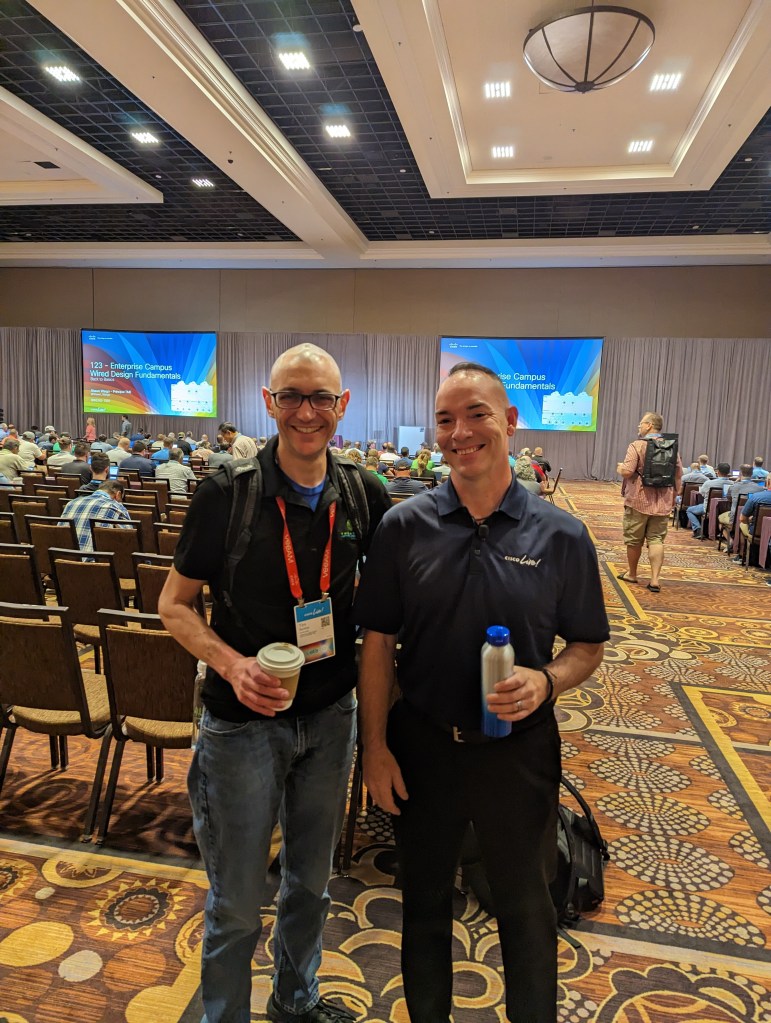
Much like acronyms in information technology, the sessions at Cisco Live are plentiful. There were two of which that I attended that I wanted to highlight. The first was 123 – Enterprise Campus Wired Design Fundamentals – BRKENS-1501 delivered by Shawn Wargo.

I have been very drawn to network design for some time now. In my opinion, all networks should start with a strong, well thought out design that can be built on over time. While continuing to seek out and learn new technologies can be fun and important, I also think it is good to go back and review what you have learned in the past from time to time. This specific session took us “back to basics” with enterprise campus wired design. It covered topics such as:

  • The core, distribution, and access layers of the enterprise campus network.
  • Redundancy options.
  • Different ways to implement campus networks such as MPLS, EVPN, and Cisco’s SD-Access.

This was a fun and engaging session and great for anyone learning campus design basics as well as those wanting to review the fundamentals.

The next session I really enjoyed was called Cisco SD-Access Best Practices – Design and Deployment – BRKENS-2502 delivered by Mahesh Nagireddy. Much like design concepts, I also enjoy understading best practices of different solutions. As far as configuration goes, the default settings are not always the best settings to implement a new technology, so it is good to find, understand, and implement best practices if they make sense to do so. This session covered best practices of the Cisco’s campus fabric SD-Access solution. What I really enjoyed about this session was that it quickly covered terminology and high level design of the SD-Access solution before getting into the concepts of site and policy design. Another benefit of this session was that I received a physical copy of the Cisco Software-Defined Access for Industry Verticals book. Check out this link to download the PDF version.

People and Community
A huge highlight to Cisco Live was getting to meet and interact with so many amazing people. There are many connections to be made at this conference and I finally got to meet many people from the Cisco Insider Champion community, among many others. In fact, one of these conversations turned into an AONE episode idea that has already been recorded! Here are some pictures that I got to take with some amazing people.

Wrap Up
I really enjoyed the experience at Cisco Live US 2023. A lot of what was covered in this post was also covered in episode 123 of the Art of Network Engineering, so check that out as well. I wanted to wrap up this post with some quick advice for those planning to attend Cisco Live in the future:

  • Prepare in advance.
    • Get on the Cisco Live website for tips and to schedule sessions as many fill up to capacity before the event.
  • Be prepared to walk a lot. Wear those comfortable shoes!
  • Bring a plastic water bottle with you and fill it often at the various available sessions. You will want to stay hydrated.
  • Make sure to consider time management. There is plenty to do, which means it is easy to get distracted.
  • All sessions are recorded and available on the Cisco Live website, along with PDFs of the slide shows after the event. These are very helpful to reference in the future!

Thank you for reading this blog post and I hope you found it beneficial!

Security+ Journey – Prying Eyes

The internet allows us to have the proverbial ‘world at our fingertips’. We have almost immediate access to countless amounts of information at practically any given time. While this is great, it can definitely be seen as a double-edged sword. Being on the internet often means disclosing information about ourselves in order to get access to information or having the ability to purchase goods and services. For instance, if you want access to that bright shiny new social media app of the week, you are going to need to create a profile and give information to the company that owns the application to be able to do so. This information could include your name, email address, age, date of birth, and phone number. There should be some documentation that shows how your data will be used. As the consumer, you will need to decide if you agree to the terms of how your personal data will be used by the company collecting it. Is is purely for use within the application, or is there potential for your data to be sold to other organizations for the purpose of use cases such as targeted advertisments? Other than for business purposes and monteary gain, our personal data could also be used for malicious purposes. An example of this would be attackers gaining unauthorized access to and using personal data for spear phishing campaigns. There are various ways in which our data and activities on the internet can be tracked:

Tracking cookies
Tracking cookies are text files that store information about an individual when they visit a website. Information about the user visiting the site can be tied to what specifically the user views or clicks on while on the site. If you have ever been on a website shopping for something specific, then start scrolling through your favorite social media feed, only to see an advertisement about the item you were just shopping for; the cause could likely be a tracking cookie.

Adware
I think of Adware as being similar to a tracking cookie, but rather than being a file, adware is a software that can not only track user data and activities, but also do the actual displaying of targeted ads itself. The advertisements themselves may be unwanted, but the adware is most likely installed with user acknowledgement.

Spyware
Out of the examples given so far, while the first two could, depending on the circumstances be questionable in their use, spyware is outright malicious. Spyware is software that records and tracks data about systems and users, to be seen/used by another entity, primarily without consent of the user. Spyware is a direct invasion of privacy and could potentially be dangerous.

Keyloggers
Like spyware, keyloggers are outright malicious. Keyloggers can come in hardware or software forms and aim to record actual typing keystrokes of a user. One use case of a keylogger for threat actors is to acquire usernames and passwords of targets for credential harvesting purposes.


While the internet can be an amazing tool to be leveraged for awesome use cases, it can also be a very scary place for our data. Increasing more with time, we need to be conscious of our presence online and the risks we might be taking by entering our private information into different sites on the internet. As much, if not more so than in the physical world, there are prying eyes all over the internet.

Security+ Journey – Gone Phishin’

As brought up in the social engineering post in this series, while attacks can rely on sophisticated payloads to accomplish malicious goals, oftentimes the point of entry is an action taken by an unsuspecting human. In that social engineering post, I also highlighted that humans are the last line of defense for an organization, in terms of information security. Threat actors will attempt to exploit vulnerabilities in human behavior using tactics such as familiarity/liking, authority, imtimidation, consensus/social proof, scarcity, and urgency. Messaging platforms are a common attack vector for threat actors, leveraging phishing campaigns as the tactic. Phishing is a type of social engineering attack in which a threat actor sends a message, for instance an email, to a target with the purpose of getting the target to do something that triggers a malicious act. An example is a link in the email to a legitimate-looking website asking the target to login. This allows the attacker to obtain the credentials of the target. Another example is malicious file in an attachment in the email that can inject malicious payloads into the target system when opened. Phishing can take multiple forms and leverage multiple vectors. In the rest of this post, we will go over some of the different types of phishing attacks.

Spear Phishing
A spear phishing attack is a targeted phishing attack. Rather than a broad phishing campaign that could be sent to a large number of people, spear phishing attacks are targeted at specific individuals or specific groups of individuals. Attackers could perform reconnaissance to gather specific information about targets, and tailor the campaign to make it more believable to the target. Individuals may be more likely to click a link or download and execute a file if they feel that the email was specifically sent to them for a reason and called out facts about them to cause them to trust the message.

Whaling
Whaling attacks bank on a concept of potentially low effort, and potentially high reward. Whaling attacks are similar to spear phishing attacks in that they are targeted at specific individuals. However, whaling attacks are further targeted at executives or wealthy people. The idea behind whaling attacks is twofold. These individuals could be high value, high reward targets, and there is a hope from the threat actors that these targets ar not as aware of cybersecurity threats as they should be.

Vishing
Vishing is a variant of the traditional phishing attack in that the vector is voice communications rather than email. Threat actors will try to get targets on the phone in hopes that they can trick them into doing something they should not do.

SMiShing
SMiShing is another variant of the traditional email phishing attack that leverages SMS texting as the vector. These attacks seem to be very popular these days and I can see how they can be effective for a few reasons. First, it seems to be an accepted practice that text messages are short, succinct, and maybe even skip common words in order to keep messages short. Because of this, targets may not be as alert to spelling and grammar issues with text messages as they would be with emails. Secondly, these messages will typically have links, however they will be shortened, and you cannot exactly hover over a link in a text message on a mobile device (at least that I am aware of) with a cursor to see where it is actually going before you click it; like you can with an email. Finally, so many legitimate services leverage text messaging to communicate updates to customers and ask for feedback. Threat actors know this and try to exploit that tactic by posing as legitimate companies to lure targets into clicking and following malicious links.


Although technical controls are great assets to organizations in terms of cyber threat defense, the human element is still the last line of defense when it comes to cybersecurity. Threat actors continue to try to leverage the actions and reactions of people to get initial footholds into systems and networks. Phishing and its variants are very popular methods of threat actors to gain that initial access. Cybersecurity awareness training is vital for all employees in an organization, regardless of role.

Security+ Journey – Social Engineering

In today’s day and age, attackers and defenders can both be very sospisticated. Threat actors can have ways to obfuscate their attacks and exploit zero day vulnerabilities. Conversely, defenders can leverage defense in depth to put multiple layers of defense between valuable assets and attackers. However, at the end of the day, there is a human element, which can be thought of as the last line of defense. Organizations can invest a large amount of money in layered defenses, but if an attack gets through a specific vector, for instance email, and the person opening the email falls for the phish, the org can be in big trouble. This is why, that even with technical defense in depth, continuous end user security training is vital. Threat actors will continue to use social engineering as an attempt to kick off their malicious endeavors. Sometimes to hack a system, an attacker must hack a human first. I know that sounds a bit extreme, but in my mind, that is essentially what an attacker is doing with social engineering. Social engineering involves using deception to get targets to do something unknowingly malicious. Examples could be trying to get someone to click a link to a fake login page to accomplish credential harvesting or tricking a user to download and install a malicious file. These attacks are leveraging technology, however they are exploiting the vulnerability of the human nature of trust. There are multiple forms that social engineering can take on that we should all be aware of, so that we can be alert and vigilant.

Familiarity/Liking
Sometimes, a social engineer may realize that they could catch more flys with honey. This means that an attacker will attempt to get a target to do something malicious by playing to a potential victims interests, or by just being kind and considerate. We as a society post a lot about ourselves on social media. Threat actors can use this information against us. They can play to our likes and dislikes to gain our trust. This is a big reason for being careful about what we post about ourselves online.

Authority and Intimidation
As a contrast approach to familiarity and liking, threat actors may attempt a method leveraging autority and/or intimidation. The authority approach can exploit individuals’ level of trust with authority figures, such as government agencies. An example of a phishing attack leveraging an authority approach would be email campaigns around tax filing time, claiming to be from a government agency requiring information about a target. This could also lead into the intimidation method. Nobody really wants to get in trouble, and attackers will try to exploit that by potentially threatenting legal action or penalties for not complying with what is asked of them in the notice or email.

Consensus/Social Proof
We often do not like making decisions on our own. It seems we constantly look to others for advice and recommendations. That in it of itself is not necessarily a bad thing at all, as long as we can trust the the person or group providing the advice or recommendations. When shopping for goods and services online or for the next coupon mobile app (my attempt at a joke), we will tend to look at the reviews left from others to see if the product is any good and if it can be trusted. Threat actors know this too and can leverage methods to leave false comments and reviews to trick us into something malicious because it appears to have rave reviews. It would be good to also look for another method of validation as well, to be safe. Multifactor product validation, anyone? C’mon, I’m trying to start a new thing. That at least sounds cool, right?

Scarcity and Urgency

Nobody wants to miss out on a “good deal”, right? Well, threat actors understand this and will definitely try to take advantage. Phishing attempts can try to exploit this desire by offering up something enticing that “will expire soon” or is a product in short supply, so you “must click NOW!”. When it comes to deals like these examples, we must always question if something seems “too good to be true”. If it seems that way, it often is a scam or malicious attempt to get your data or financial information. The scarcity and urgency tactic could potentially also be used along with the authority and intimidation tactic to trick people into a malicious activity right now “or else”.


Organizations can spend a lot of money and resources to protect against threats and migitage risk, however people are still the last line of defense and threat actors will try to exploit different weaknesses in human behaviors. This is why continous security training programs, security testing, and employee engagement about security are important. Employees of an organization need to understand that they are part of the defense against security related threats and that we cannot rely on technical, operational, and managerial controls alone.

Security+ Journey – DNS for Recon

For attackers and defenders, tools are very important. If a threat actor does not know much about a potential target, they will need to perform some reconnaissance. There are many tools out there that can be leveraged for recon, some of which are readily available on popular operating systems. These tools are not necesarily built with a purpose of reconnaissance as a goal, but they can be used that way. One way for a threat actor to find out more about a target domain is by levearaging the Domain Name System (DNS). There are many different types of DNS records that can provide some insight about what a potential target has on their network. By nature of systems that leverage TCP/IP, computers need to be able to find out the IP addresses of the destination systems with which they are attempting to communicate. At a high level, DNS is used to translate familiar names into IP addresses, in a client/server model. This keeps us humans from having to memorize IP addresses of websites and the like, keeping both private and public networks (the internet) usable and dynamic. Tools such as nslookup (Windows), dig (Linux), and dnsenum can be used to query DNS servers to gather information about domains.

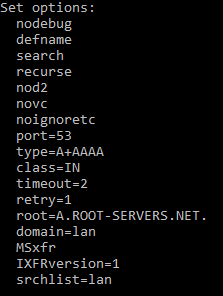
Now, let’s take a look at the nslookup utility within Windows to see what some of the options are that exist within the tool. First off, to run nslookup, just open up a command prompt, type nslookup and hit the enter key. This will take you into the nslookup prompt. First, we can look at the existing settings within the utility using the set all command.

Output from the set all command.

An option of note listed above is the type option. This sets the type of query that will be performed. You can see above that it is currently set to the default of A+AAAA, so it will query for IPv4 and IPv6 A records. The available options are: A,AAAA,A+AAAA,ANY,CNAME,MX,NS,PTR,SOA,SRV. To change the record type, you can enter set type=<record type>. Another option, that could be potentially used for reconnaissance is the all type. If you enter set type=all (then hit enter), then enter a domain name to query; if the server allows it, it will return the answers of all records in that DNS zone. This type of query can be thought of as a zone transfer.

Once the settings are configured the way you want them (oftentimes they can be left default if you are just wanting to query basic A records), you are just about ready to query a domain name. Sometimes, when it comes to troubleshooting potential DNS issues, perspective is key. When record changes are made, especially to public facing DNS servers, by nature of time-to-live (TTL) values, it can take ptotentially a considerable amount of time for a record to change to reach global DNS propagation. You may want to query different local or public DNS servers to see how they are resolving the record in question. That could explain why a record is resolving correctly for some users that point to DNS server #1 and incorrectly for other users that point to DNS server #2. Within nslookup, to change the server you want to query, you just type server followed by a space, followed by the IP address of name of the DNS server that you want to query (then hit enter). Finally, to query a record, you just have to type in the name of the record (as a fully qualified domain name) and hit the enter key. If the DNS server you are pointing to is able to resolve this record to an IP address, you will the result on the screen.


Leveraging DNS query tools such as nslookup, dig, and dnsenum can absolutley be used as methods of gathering reconnaissance by threat actors. Having a list of records from a target domain could give the threat actor information about services the target is running, or in the least, a list of devices to scan for open services and/or vulnerabilities.